Version: Next
Architecture
The overall architecture of HAMi is shown as below:
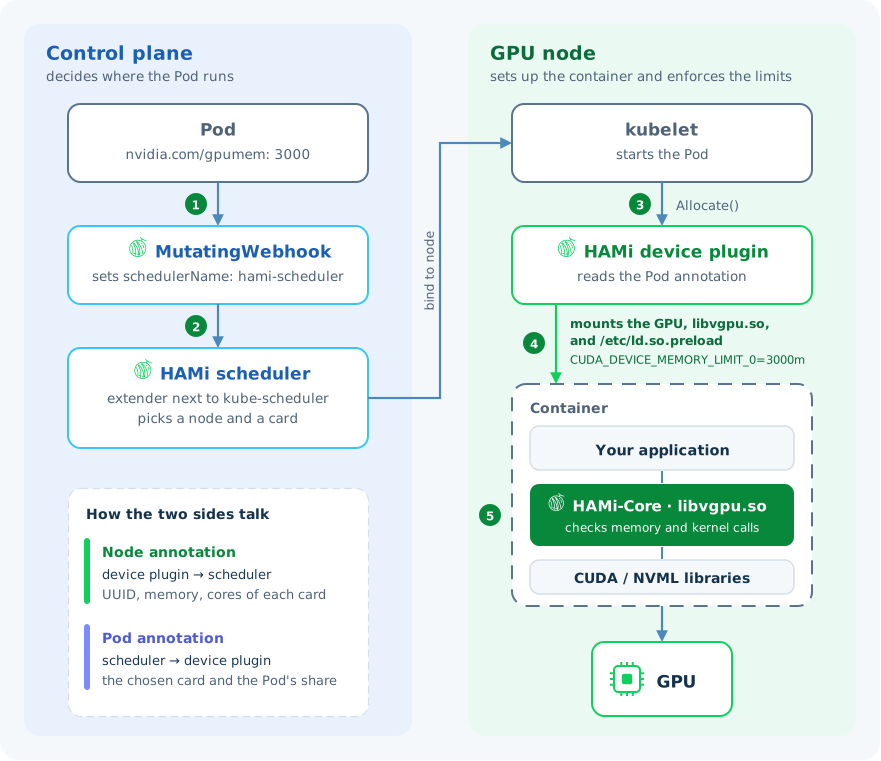
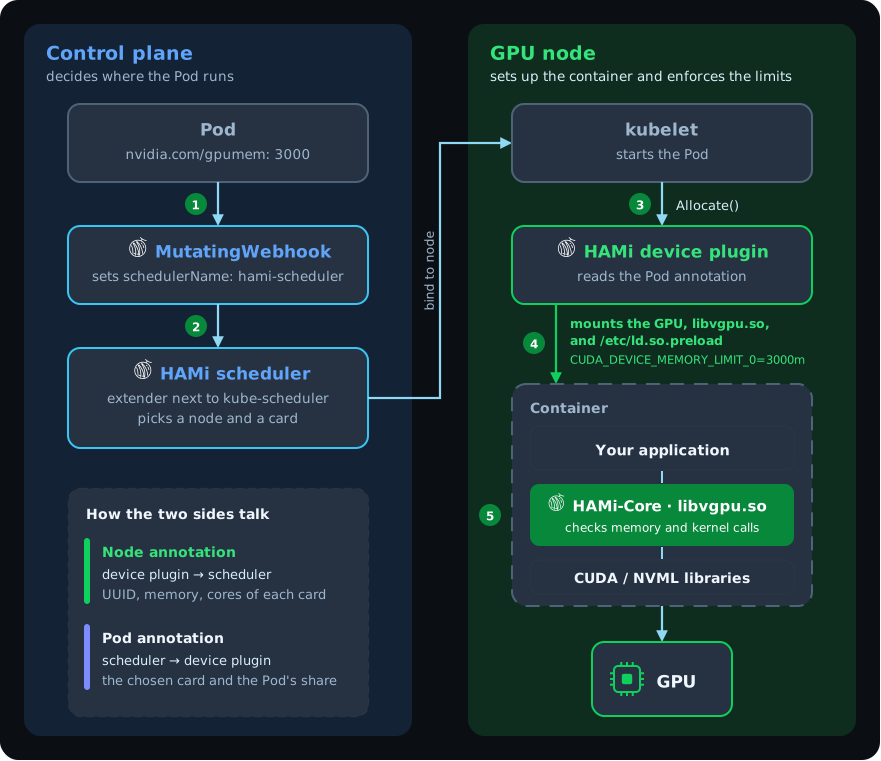
HAMi consists of the following components:
| Component | Runs as | What it does |
|---|---|---|
| MutatingWebhook | Part of the hami-scheduler Deployment | Checks each new Pod. If the Pod asks for HAMi resources and names no other scheduler, sets schedulerName to hami-scheduler. Other Pods pass through unchanged. |
| HAMi scheduler | hami-scheduler Deployment, next to kube-scheduler as a scheduler extender | Keeps a view of every GPU in the cluster. Filters nodes, picks a card, and writes the choice to the Pod's annotations. |
| HAMi device plugin | DaemonSet on each GPU node | Reports the node's cards to kubelet and to the scheduler. When a Pod starts, mounts the chosen card and HAMi-Core into the container and passes the limits as environment variables. |
HAMi-Core (libvgpu.so) | Library loaded inside the container | Intercepts CUDA and NVML calls. Rejects memory allocations past the limit and can throttle kernel launches to the compute share. |
The path of a Pod
Take a Pod that asks for nvidia.com/gpumem: 3000:
- Admission. The webhook sees a HAMi resource and routes the Pod to
hami-scheduler. - Scheduling. The HAMi scheduler reads each card's memory and compute from node annotations. It keeps the nodes with a card that has 3000 MiB free, picks one card by policy, and records the card's UUID and the Pod's share in Pod annotations.
- Start. kubelet on the chosen node starts the Pod and calls the device plugin's
Allocate. - Injection. The device plugin reads the annotations, mounts the card,
libvgpu.so, and/etc/ld.so.preloadinto the container, and setsCUDA_DEVICE_MEMORY_LIMIT_0=3000m. - Enforcement. When any process in the container starts, the dynamic linker loads HAMi-Core first. From then on, HAMi-Core checks memory allocations and kernel launches against the limits. See Device resource isolation.
Learn more
- GPU virtualization principles: a detailed walk through registration, scheduling, and injection
- Protocol design: the annotations the scheduler and device plugin exchange
